
The Freshman Class project this year is to create a digital library where Rotary can store photos and short videos of the many activities we support. Rotarians can use this library to put together presentations to share with the community. The first presentation will be a marketing video that will be ready in time for our club’s 50th anniversary!
WE NEED YOUR HELP! Please scroll through your phones and computers to see what photos or short videos you have taken over the years. Then, follow these instructions to upload them. There are two ways to include your photos and videos in the library:
OPTION 1: PREFERRED
• Open the following link: https://bit.ly/SCR-PhotoUpload
• After login, you’ll see a form titled: Summit County Rotary Upload Photos & Videos
• Next, you will need to fill in two required fields:
- Name and date of the event in the photo or video
- Name of Rotarian uploading video
• There is one optional field:
- Names of Rotarians in the picture
• Then, click on “Add file” at the bottom of the form:
• Open the following link: https://bit.ly/SCR-PhotoUpload
• After login, you’ll see a form titled: Summit County Rotary Upload Photos & Videos
• Next, you will need to fill in two required fields:
- Name and date of the event in the photo or video
- Name of Rotarian uploading video
• There is one optional field:
- Names of Rotarians in the picture
• Then, click on “Add file” at the bottom of the form:

• You will see the following window, where you can drag images and videos into the space indicated or click “Browse” to browse your computer for them. You can select multiple files (up to 10 totaling up to 1GB of size) at once to save time. Note, 1,000MB = 1GB.

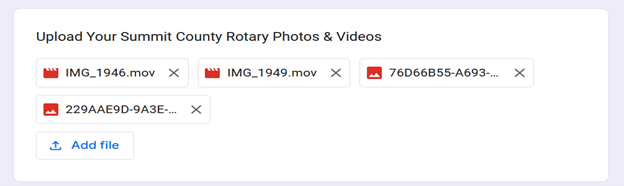
• Once you upload your files, you’ll see them populating the space. You can click the “Add file” button again to add more, up to the limit.
• If you’re unsure of the total size of your files or accidentally select more than ten files, you’ll see this error message.

• When you’re finished, click “Submit” and you’ll see confirmation that your upload was successful.
• When you’re finished, click “Submit” and you’ll see confirmation that your upload was successful.
OPTION 2 – NOT PREFERRED, BUT USEFUL IF YOU DON’T HAVE A GMAIL ACCOUNT
• Send an email with the images/videos attached to: summitcountyrotary1975@gmail.com
• This email account will accept more than 10 files, but the total can’t exceed 35MB. So, unless videos are short, they are unlikely to be successfully emailed.
You’ll know you are sending too much if you get an error message. In this case, you might be able to separate your files into multiple emails, or upload the video(s) to another site and email a link. (Our team can help with this!)
You’ll know you are sending too much if you get an error message. In this case, you might be able to separate your files into multiple emails, or upload the video(s) to another site and email a link. (Our team can help with this!)
Need help? Check out this 4 minute “how to” video created by Rotarian Christine Murakami: https://bit.ly/RCSC-photos. Questions? Email Christine Murakami at: xtmurak@hotmail.com.